
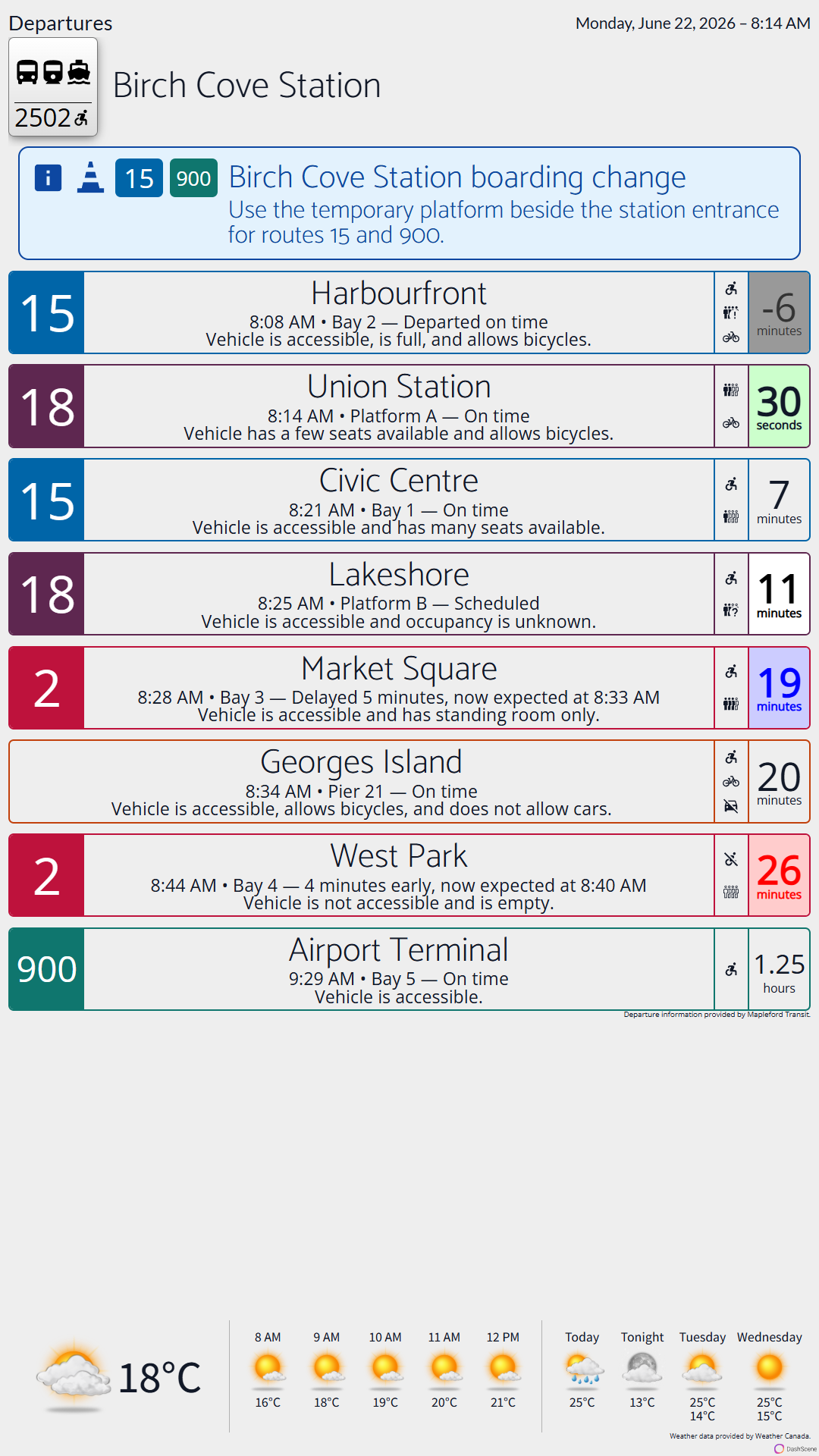
More than a departure board
DashScene includes a layout built specifically for rider information. It brings together clear service alerts, strong route identification, past and upcoming departures, readable status summaries, and rider-facing vehicle details in one view. DashScene helps people understand not just when something leaves, but what is happening and what they should do next.
- Show how early or late a departure is
- Show past departures to answer “Did I miss it?”
- Surface accessibility, bicycles, cars, occupancy, and other trip details where feeds support them
- Give riders walking-minute and fair-warning cues before it is time to head to the stop
- Keep alerts clear with route-specific styling, severity, cause, and effect context
Built for every stop, station, and terminal
Create displays that match your agency, serve your locations, and feel familiar to your riders. DashScene supports customizable themes, backgrounds, colours, and layouts for everything from compact stops to full station departure boards.


Built for better rider information
DashScene combines timing, status, alerts, and context in a way that helps riders make better decisions when plans change.
It is easier to scan, easier to understand, and more informative than a screen that only shows a scheduled or estimated time and a short message.
Know where the trip stands
Show on-time context, early or late status, and even past departures so riders can quickly understand what has already happened.
Make disruptions easier to read
Agency-wide, route-wide, and stop-specific alerts stand out clearly, with route colours, route pills, and readable summaries that make relevance easier to spot.
Help riders move at the right time
Walking minutes and fair-warning cues help passengers decide when to leave the terminal or waiting area and head to their stop.
Surface broader public alerts
Show public emergency alerts alongside rider information when urgent information applies to the display’s location.
Where agencies can use DashScene
DashScene works best where riders pause, wait, plan, or make a small decision about what comes next.

Stations and terminals
Bring richer, more readable departure information into concourses, waiting areas, and boarding environments.

Customer spaces
Use DashScene in service areas, lobbies, and shared waiting spaces where riders need clear information without friction.

Partner locations
Extend useful transit information into nearby cafés, storefronts, offices, campuses, hotels, and other community spaces.
Help nearby businesses become more transit-oriented
DashScene does not have to stop at agency-owned property. Shared displays in nearby businesses can make transit more visible, make local destinations more useful to riders, and create more opportunities for riders to stay engaged with the area around a stop or terminal.
Extend transit into the surrounding area
Bring live departure information into the places riders already spend time, not just onto platforms and shelters.
Create room to linger
When riders know how far a stop is and when they should head over, they can spend a little longer in a café, shop, or terminal common area before leaving.
Support local business visibility
DashScene can help nearby businesses feel more connected to the transit network and create more opportunities for visibility and rider foot traffic.
Secure, simple, and easy to keep current
DashScene is designed to be secure and straightforward to deploy. It runs on any modern Chromium browser, especially in kiosk mode, updates itself, and is easy to maintain over time.
Browser-based deployment
Run DashScene on any modern Chromium browser, with kiosk mode especially well suited to public displays.
Self-updating
DashScene keeps itself current, reducing maintenance burden once a display is live.
Easy to maintain
Simple setup, straightforward upkeep, and a lighter operational burden over time.
Before you get started
A quality GTFS Static feed and GTFS Realtime data where available. DashScene is designed to work with the data you already publish, without requiring custom APIs or bespoke integrations.
Yes, where your GTFS Realtime and related datasets support it. If a feed does not include certain fields, DashScene still provides strong departure information without them.
Yes. DashScene can combine departures with weather so riders can make better decisions before they leave a terminal or head to a stop.
Yes. DashScene can work in nearby businesses and community spaces that want to become more transit-oriented and more useful to riders.
Self-serve setup is available, but transit agencies are encouraged to contact DashScene first. Agency deployments benefit from a conversation about data quality, rollout planning, rider needs, and where displays will have the most value.
No. DashScene is designed to be easy to set up and maintain, runs on modern Chromium browsers, and updates itself over time.
Yes. In addition to service alerts supplied through transit feeds, DashScene can show public emergency alerts that apply to the display’s configured location.